
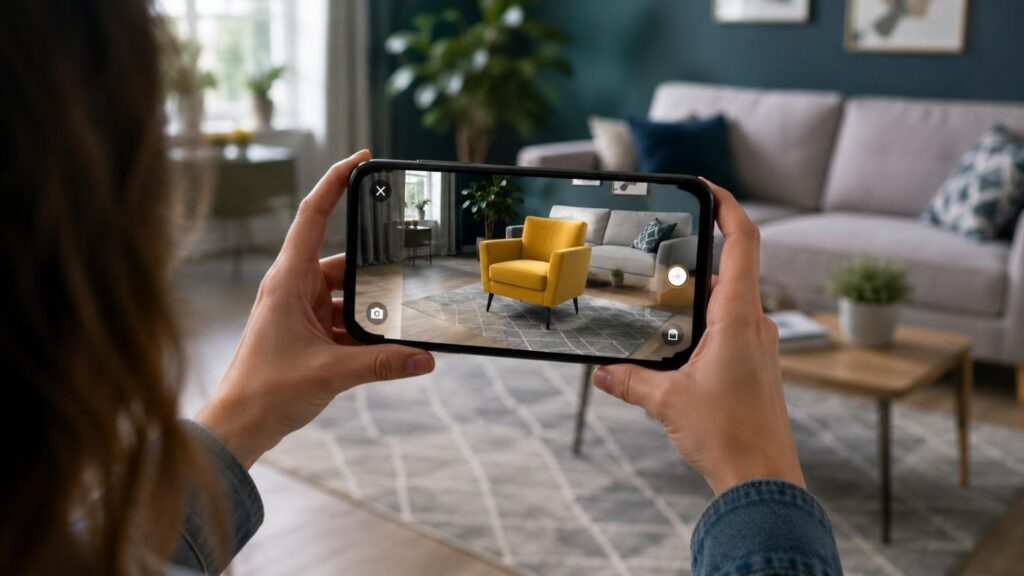
The Role of Augmented Reality in Mobile Apps
The role of augmented reality in mobile apps has expanded significantly as smartphones have gained better cameras, faster processors, improved motion sensors, and more capable development frameworks. What was once mainly associated with entertainment, filters, and games is now used across retail, education, navigation, property, healthcare, tourism, maintenance, manufacturing, and professional services.
Augmented reality changes how users interact with digital information. Instead of keeping every instruction, object, or piece of data inside a flat interface, AR connects that information to the user’s surroundings. A digital sofa can appear inside a living room. An arrow can point toward a physical doorway. A training animation can appear beside a piece of equipment. These experiences help people understand information in relation to size, distance, position, and movement.
The growth of augmented reality mobile apps does not mean every application needs an AR feature. The technology introduces additional design, development, testing, privacy, compatibility, and performance considerations. A poorly planned experience can confuse users, drain battery power, perform inconsistently, or create physical safety concerns.
For that reason, businesses should approach AR as a problem-solving tool rather than a visual trend. The strongest projects begin with a specific user need and then determine whether AR is the most suitable way to address it. This guide explains how mobile AR works, where it creates value, how teams develop it, and which challenges should be addressed before launch.
Related Articles
What Is Augmented Reality and How Does It Work in Mobile Apps?
Augmented reality is a technology that combines a live view of the real world with computer-generated content. This content may include 3D models, text, icons, animations, measurements, directions, sound, or interactive controls. Unlike virtual reality, AR does not normally replace the physical environment. Instead, it adds digital elements to what the user can already see through a smartphone or tablet camera.
For an AR experience to appear convincing, the mobile device must understand its own movement and some features of the surrounding environment. The app may need to identify a wall, floor, table, image, face, object, or geographic location. It then uses this information to decide where digital content should appear and how it should behave as the user moves.
Some applications use marker-based AR, which activates content after the camera recognizes a particular image or visual target. Others use markerless augmented reality, which relies on surfaces, depth, motion, or location rather than one printed marker.
The user sees the final experience as one combined scene. Behind the interface, however, the device is continuously processing camera images, sensor data, spatial information, lighting conditions, and graphics. Understanding these underlying processes helps businesses plan realistic AR features and avoid promising an experience that available devices cannot deliver reliably.
What Technologies Power Mobile Augmented Reality?
Mobile augmented reality depends on several technologies working together in real time. The camera captures the physical environment, while sensors such as the accelerometer and gyroscope measure movement and orientation. Computer vision software analyzes the camera feed to identify useful features, surfaces, objects, or images.
Motion tracking estimates how the device moves through space. This allows the application to keep a virtual object in a stable position even when the user walks around it or changes the camera angle. Environmental understanding helps the app detect flat or vertical surfaces, such as floors, tables, and walls. Plane detection is commonly used when users need to place a product or model on a real surface.
Light estimation measures aspects of the surrounding lighting so that digital content can appear more consistent with the environment. Depth sensing helps the device estimate how far objects and surfaces are from the camera. This can improve occlusion, allowing a real object to appear in front of a virtual object when appropriate.
Spatial anchors store important positions within the AR scene. Together, these technologies make digital content appear connected to the real world rather than floating unpredictably across the screen.
| Technology | Primary Purpose | Example Use |
|---|---|---|
| Motion Tracking | Tracks device movement | Stable placement of virtual objects |
| Plane Detection | Detects flat surfaces | Place furniture on the floor |
| Depth Sensing | Measures object distance | Better object positioning |
| Light Estimation | Matches lighting conditions | More realistic 3D objects |
| Computer Vision | Recognizes images and objects | Image recognition and object tracking |
| Spatial Anchors | Keeps virtual content fixed | Persistent AR experiences |
What Is the Difference Between AR and VR?
Augmented reality and virtual reality are both immersive technologies, but they create very different user experiences. AR keeps the physical environment visible and adds digital content to it. VR places the user inside a computer-generated environment that normally replaces most or all of the real-world view.
A mobile AR furniture application, for example, can display a digital chair inside the user’s actual room. The customer can compare its size, color, and position with existing furniture. A virtual reality application would instead place the user inside a completely simulated room, often through a dedicated headset.
This difference affects how the technologies are used. AR is well suited to situations where users must continue seeing and interacting with their surroundings. Examples include navigation, product visualization, equipment guidance, property measurement, and location-based information.
VR is often more suitable for fully immersive simulations, training environments, games, and virtual tours. Neither approach is automatically better. The right choice depends on the task, available hardware, required level of immersion, and whether the physical environment should remain part of the experience.
Why Is the Role of Augmented Reality in Mobile Apps Important?
The role of augmented reality in mobile apps is important because it changes information from something users merely read or view into something they can experience within a relevant physical context. This can make complex instructions clearer, product choices easier, and location-based information more immediate.
Many mobile experiences require users to imagine how digital information relates to the real world. Product dimensions must be translated into physical size. A map must be interpreted in relation to nearby streets. Written instructions must be connected to the correct component or location. AR reduces this mental effort by placing information directly where it applies.
The technology can also support stronger engagement because users actively explore, move, compare, and interact rather than passively scrolling through content. However, engagement should not be confused with novelty. A feature may attract attention during its first use but still fail if it is difficult to control or does not help the user achieve a meaningful outcome.
Businesses should therefore evaluate AR according to practical value. Does it help the user make a more confident decision? Does it reduce the number of steps required to complete a task? Does it explain something that would be difficult to communicate with ordinary media? When the answer is yes, AR can become an important part of the product experience rather than a temporary marketing feature.
How Does AR Improve the User Experience?
AR improves the user experience by making digital information more visual, immediate, and relevant to the user’s surroundings. Instead of asking someone to interpret separate descriptions, images, and measurements, an AR feature can combine those details inside one interactive view.
Consider a customer buying furniture online. A standard product page may provide photographs, dimensions, and written details. These are useful, but the customer must still estimate whether the product will fit and look appropriate in a particular room. An AR feature can display the item at a realistic scale, allowing the user to move it, rotate it, and compare it with the available space.
The same principle applies to training and maintenance. Instructions can appear near the component they describe, reducing the need to move repeatedly between a manual and the physical task. Educational applications can help learners examine structures that are difficult to understand through static diagrams.
Good AR user experience also depends on simplicity. Users should immediately understand why camera access is required, how to scan the environment, and what action to take next. AR improves usability only when the interaction is clearer than the conventional alternative.
What Business Value Can AR Create?
AR can create business value by improving product understanding, supporting customer confidence, reducing uncertainty, and making services easier to use. The exact return depends on the industry, target audience, quality of execution, and relevance of the selected use case.
In retail and e-commerce, 3D product visualization may help customers evaluate size, placement, style, or color before purchasing. In customer support, an AR guide may explain installation or setup steps without requiring the user to interpret a long manual. In property and interior design, room-scanning features can help professionals collect spatial information more efficiently.
Businesses can also use AR to strengthen brand engagement. Interactive packaging, printed materials, events, and physical locations can become entry points for digital content. However, brand engagement should support a clear action, such as learning about a product, viewing instructions, comparing options, or contacting the business.
Before development begins, teams should define measurable objectives. These may include greater use of a product configurator, fewer support questions, higher completion rates, longer engagement with educational content, or increased customer confidence. Clear metrics make it easier to determine whether the AR feature provides lasting value.
Where Are Augmented Reality Mobile Apps Used?
Augmented reality mobile apps are used in industries where users benefit from understanding digital information in relation to a physical object, place, or activity. The technology is particularly effective when scale, position, distance, movement, or surrounding context influences a decision.
Retailers use AR to help customers preview products. Educational platforms use it to present interactive models. Navigation applications can display directions over a live view. Property tools can assist with room planning and spatial documentation. Maintenance applications can place instructions near equipment, while tourism apps may reveal information about landmarks and destinations.
The quality of the experience depends on more than the industry. Teams must identify the exact task AR will improve. An application should not use AR merely because competitors are using it. It should address a specific difficulty that traditional images, videos, or text cannot solve as effectively.
The following table summarizes common augmented reality app examples and the requirements that often influence their success:
| Industry | AR Use Case | User Value | Important Requirement |
|---|---|---|---|
| Retail | Virtual product placement | Preview scale and appearance | Accurate 3D models |
| Education | Interactive learning objects | Visualize difficult concepts | Clear learning objective |
| Navigation | Real-world directional overlays | Understand the next movement | Reliable location data |
| Property | Room scanning and planning | Capture spatial information | Supported sensors |
| Maintenance | Visual instructions | Follow steps near equipment | Safe, readable guidance |
| Marketing | Interactive packaging | Access additional content | Fast and simple activation |
Retail, E-Commerce and Product Visualization
Retail and e-commerce are among the most visible areas of mobile AR adoption because shoppers often struggle to evaluate a physical product through photographs alone. AR shopping apps can reduce this gap by allowing users to preview an item inside their environment before making a decision.
Furniture, home décor, appliances, lighting products, and other size-sensitive items are natural candidates for 3D product visualization. Customers can place a digital product on a detected surface, view it from different angles, and compare it with surrounding objects. Beauty applications may use face tracking to preview cosmetics, while fashion experiences may provide limited virtual try-on features.
Accuracy is critical. The 3D model should reflect the product’s real proportions, shape, materials, and available colors. If a digital item appears at the wrong scale or uses unrealistic textures, it may create false expectations and reduce trust.
The interface should also make comparison easy. Users may need options to change finishes, switch models, take screenshots, save a preferred setup, or move directly to the product page. A successful augmented reality shopping experience connects visualization with the broader buying process rather than treating AR as an isolated feature.
Education, Navigation and Location-Based Experiences
Educational AR applications can make abstract or complex subjects easier to explore. A learner may examine a three-dimensional biological structure, view the internal parts of a machine, explore a historical object, or observe how a scientific process develops over time.
The value comes from interaction. Students can move around a model, adjust its scale, reveal layers, or select individual parts for further explanation. This can support visual understanding, although AR should complement rather than replace clear teaching, discussion, reading, and assessment.
Navigation is another important use case. Conventional maps require users to match a diagram with the physical environment. AR navigation apps can place arrows, labels, or route information over a live camera view. This may be helpful in large buildings, shopping centers, airports, campuses, tourist areas, or unfamiliar streets.
Location-based AR can also attach content to a specific geographic position. A tourism application may display information near a landmark, while a campus app may identify nearby facilities. These experiences require reliable positioning and careful safety design. Users should not be encouraged to stare continuously at a screen while walking through traffic, crowds, stairs, or unfamiliar spaces.
Property, Maintenance and Professional Workflows
Property, construction, maintenance, and professional services can use AR to support tasks that involve physical spaces and equipment. These applications often focus less on entertainment and more on measurement, documentation, training, inspection, or step-by-step assistance.
Room-scanning tools can help users create a basic digital representation of an indoor space. Depending on the device and platform, the application may identify walls, doors, windows, furniture, and room dimensions. This information can support property planning, interior design discussions, space documentation, and early-stage project estimates.
Maintenance applications can display visual instructions beside the relevant machine or component. A technician may see which panel to open, which part to inspect, or which step comes next. Remote-support systems may also allow an expert to place digital annotations within another user’s camera view.
Professional AR requires careful testing because errors can have serious consequences. Measurements may need independent verification, and safety-critical procedures should be approved by qualified specialists. The app should clearly distinguish between general guidance and information that requires professional judgment. Reliable tracking, readable content, and straightforward recovery from errors are more important than decorative visual effects
How Do You Add Augmented Reality to a Mobile App?
Adding augmented reality to a mobile app requires more than selecting a framework and importing a 3D model. The process should begin with a clear understanding of the user problem, the physical environment, supported devices, and the action the AR experience must help users complete.
A team should first determine what the application needs to recognize. It may need to identify a horizontal surface, track a face, detect an image, understand room geometry, recognize an object, or use geographic information. Each use case creates different technical and design requirements.
The next decision involves platform strategy. A business may build separate native experiences for iOS and Android, use a cross-platform engine, or provide a browser-based experience. The right approach depends on the existing mobile product, development resources, required performance, and target audience.
AR also depends heavily on content quality. Three-dimensional models, animations, instructions, sound, and interface elements must be optimized for mobile devices. Large or overly detailed assets can create slow loading, unstable frame rates, and device heating.
A structured development process reduces risk. Teams should validate the use case with a small prototype, test it in realistic environments, collect feedback, and only then expand the feature. This prevents businesses from investing heavily in an experience users find confusing or unnecessary.
| Development Stage | Main Objective | Expected Outcome |
|---|---|---|
| Define the Use Case | Identify the user problem | Clear AR requirements |
| Choose the Platform | Select ARKit, ARCore, or Unity | Suitable development framework |
| Create AR Assets | Develop optimized 3D models | Smooth visual experience |
| Prototype the Feature | Test core functionality | Validate the concept |
| Test Across Devices | Check compatibility and performance | Stable user experience |
| Launch & Monitor | Publish and analyze usage | Continuous improvements |
Step 1 — Define the Problem and AR Use Case
The first step is to describe the user problem in one clear sentence. This keeps the project focused on value instead of technology. For example: “The customer should be able to see whether this table fits in the available dining area.”
The team can then define the action required to achieve that outcome. The application may need to detect the floor, display the product at a correct scale, let the user move and rotate it, and provide a direct link to product details. These requirements are more useful than a vague instruction to “add augmented reality.”
It is also important to determine whether AR is central to the application or an optional feature. A measurement or scanning product may depend completely on AR. An e-commerce app, however, should usually allow users to browse and purchase products even when their device does not support the AR experience.
Teams should identify possible limitations early. The feature may perform differently in poor lighting, crowded rooms, reflective environments, or on older devices. Defining these conditions before development helps create realistic expectations and ensures that appropriate instructions or fallback options are included.
Step 2 — Select the Right Development Platform
The platform should match the target devices, required features, team expertise, and long-term maintenance plan. Native Apple development may use ARKit and RealityKit for iPhone and iPad experiences. Android applications commonly use Google ARCore. Cross-platform teams may consider Unity AR Foundation when they need to manage shared AR functionality across iOS and Android.
Native frameworks can offer close access to platform-specific capabilities and interface standards. They may be suitable when an application targets one operating system or relies heavily on features unique to particular devices. Cross-platform development can reduce duplication, but teams must still test each operating system and device family separately.
Browser-based experiences may use technologies related to WebXR, but browser support, device compatibility, and available features must be evaluated carefully. A web experience can lower the barrier to entry because users may not need to install an application, yet it may not provide the same capabilities or consistency as a native app.
The team should also consider existing infrastructure. Product data, user accounts, analytics, content management, and e-commerce systems may need to connect with the AR feature. Platform selection should support the complete product workflow, not only the visual AR scene.
Step 3 — Prototype, Test and Publish
A small prototype should test the most important interaction before the team creates a complete production system. The prototype might include one product, one environment type, and one simple action. Its purpose is to confirm that users understand the experience and that the technology performs reliably.
Testing should take place in realistic environments rather than only inside a development office. A product-placement feature should be tested in rooms with different sizes, lighting conditions, flooring materials, and amounts of visual detail. A location-based application should be tested across the actual routes and locations where it will be used.
Important test cases include permission denial, interrupted tracking, limited space, low light, slow networks, unsupported devices, device rotation, incoming calls, and returning to the app after it has moved into the background. Teams should also monitor battery consumption, memory use, frame rate, loading speed, and device temperature.
Before publication, the application should provide clear onboarding, privacy explanations, accessible alternatives, and recovery instructions. Analytics should measure meaningful actions such as completed placements, saved configurations, successful scans, and movement from the AR experience to the next business step.
What Challenges and Best Practices Should Teams Consider?
AR applications must process live camera information, sensor data, environment details, and digital graphics at the same time. This creates challenges that ordinary mobile screens may not face. Device capability, lighting, available space, user movement, privacy, accessibility, and performance can all influence the quality of the experience.
Compatibility is one of the first concerns. Two smartphones may run the same operating system but have different cameras, processors, sensors, and depth capabilities. An experience that performs smoothly on a recent high-end device may struggle on an older supported model.
The physical environment also changes constantly. Tracking may become unstable when a room is too dark, lacks visible surface details, contains reflections, or includes rapid movement. The application must explain these limitations without blaming or confusing the user.
Privacy requires careful attention because AR often depends on camera access and may use location, motion, or spatial data. Users should understand what information is required, why it is needed, and whether it is processed locally or through an online service.
Good AR design balances realism with clarity. Digital content should appear stable and believable, but it must also remain easy to control. Teams should treat reliability, safety, and accessibility as core product requirements rather than tasks to address immediately before launch.
Device Compatibility and Performance
Device compatibility affects who can access the AR feature and how consistently it performs. Smartphones differ in processing power, memory, camera quality, graphics capability, sensor accuracy, and support for platform-specific AR services. Some advanced features may also depend on depth sensors or other hardware that is not available on every model.
Developers should use official compatibility information and test on a representative group of real devices. Testing only on the newest flagship phone can hide problems experienced by a large part of the target audience. The device set should reflect the operating systems, screen sizes, hardware levels, and geographic markets used by actual customers.
Performance optimization should begin early. Large 3D models, high-resolution textures, complex lighting, excessive shadows, and unnecessary animations can reduce the frame rate. When visual content appears unstable or delayed, users may lose confidence in object placement and measurement.
Teams should reduce asset size, remove unseen geometry, compress textures carefully, and load content only when needed. Unused AR capabilities should be disabled. Where possible, the app should offer a non-AR method of accessing the same essential information so that unsupported users are not excluded.
Privacy, Permissions and Physical Safety
AR applications often require camera access because the camera provides the live view of the environment. Some experiences may also use location, motion information, room geometry, images, or cloud-based spatial services. These requirements create privacy responsibilities that should be addressed through both product design and clear communication.
The app should request access only when the user opens the relevant feature. Asking for camera permission immediately after installation, without context, may reduce trust. A short explanation should describe the benefit, such as placing a product in the room or scanning a surface.
Teams should collect only the data required for the feature. Privacy policies and in-app disclosures should explain whether images or spatial information remain on the device, are temporarily processed, or are transmitted to another service.
Physical safety is equally important. Users may move while looking through the camera, which can reduce awareness of stairs, furniture, traffic, or other people. The interface should remind users to check their surroundings and avoid interactions that encourage walking backward. Long sessions should be limited when they may cause fatigue, discomfort, or reduced awareness.
Onboarding, Realism and Accessibility
AR onboarding should guide users at the moment they need help. A long tutorial before the camera opens is often difficult to remember. Clear visual instructions can instead explain how to move the device, find a surface, place an object, adjust its position, or recover when tracking is lost.
The interface should use familiar controls whenever possible. Pinch gestures can adjust scale when scaling is appropriate, while dragging and rotation controls can support product placement. However, some products must remain at a fixed real-world size. In those cases, the app should prevent scaling and explain why.
Realism can improve confidence. Accurate lighting, shadows, scale, and occlusion help digital objects appear connected to the physical scene. Yet realism should not make controls hard to see. Selection indicators, placement boundaries, warnings, and action buttons must remain clear.
Accessibility should be considered from the beginning. Some users may have difficulty holding a device steadily, moving around a room, interpreting visual depth, or using complex gestures. Important information should also be available through conventional text, images, audio, or controls. AR can expand access to information, but it should not become the only way to complete an essential task.
Quick Answer About the Role of Augmented Reality in Mobile Apps
Augmented reality allows a mobile application to place digital information inside a live view of the physical world. Through a smartphone or tablet camera, users can see virtual objects, instructions, directions, measurements, animations, or product information positioned within their actual surroundings.
The role of augmented reality in mobile apps is not simply to make an application look more advanced. Its real purpose is to help users understand, compare, learn, navigate, or complete a task more effectively. A furniture app may show a full-size table inside a room, while a maintenance app may place instructions beside a machine component. An educational application may allow students to examine a three-dimensional model from several angles.
AR delivers the greatest value when physical context matters. It should reduce confusion, support decision-making, or make complex information easier to understand. When used without a clear purpose, however, it can add unnecessary development costs, performance demands, and usability problems.
What Role Does AR Play in a Mobile App?
AR acts as a bridge between digital information and the user’s physical environment. Traditional mobile interfaces present information on flat screens through text, images, menus, and videos. Augmented reality extends that interface by placing relevant content directly into the space where the user is performing a task.
For example, an ordinary shopping app may show a photograph and product dimensions. An AR shopping app can let the customer place a life-size digital version of the product inside a room. This helps the user understand scale, appearance, and placement without relying entirely on imagination. Similarly, a navigation app can display directional arrows over a live street view rather than asking users to interpret a conventional map.
The role of AR should always be connected to a practical outcome. It may help customers evaluate a product, guide employees through a procedure, make a lesson easier to understand, or add useful information to a physical location. Successful AR features improve the core mobile experience instead of distracting from it.
What Is the Main Value of Mobile AR?
The main value of mobile AR is context. It presents digital information at the moment and location where that information is most useful. Users do not need to mentally translate a two-dimensional image into a real-world situation because the app performs part of that interpretation for them.
This contextual experience can reduce uncertainty. A customer can see whether a product fits a room. A technician can identify the correct component before starting a repair. A visitor can understand which direction to walk without repeatedly checking a map. A student can rotate and inspect a complex model instead of studying one static diagram.
Mobile devices also make AR more accessible than experiences that depend on specialized headsets. Many people already carry smartphones with cameras, processors, and motion sensors capable of supporting basic or advanced AR features. This accessibility allows businesses to introduce immersive technology through an existing customer channel. However, the feature must still provide a clear benefit, work reliably, and offer a suitable alternative for users with unsupported devices.
Frequently Asked Questions
Users researching mobile augmented reality often want clear answers about its purpose, technical requirements, business value, cost, compatibility, and future potential. The following questions address common informational and commercial concerns without assuming that every reader has technical development experience.
For beginners, it is useful to understand that AR is not one single feature. It can involve image recognition, product placement, face tracking, room scanning, geographic positioning, or interactive instructions. The complexity of an application depends on what it needs to recognize and how accurately the digital content must interact with the real world.
For businesses and development teams, the most important question is not whether AR is popular. The important question is whether it improves a specific part of the customer or employee experience. A simple and dependable feature may create more value than a visually impressive experience that is slow or confusing.
These frequently asked questions also highlight the need for realistic planning. Device support, development cost, asset creation, privacy, testing, and maintenance should be discussed before a project begins. Clear answers help decision-makers determine whether AR is appropriate for their app and which type of experience is most relevant.
What Is Augmented Reality in a Mobile App?
Augmented reality in a mobile app is a feature that combines a live camera view with digital content. The application may display text, icons, directions, animations, measurements, or 3D objects so that they appear connected to the user’s physical surroundings.
The device uses information from its camera, motion sensors, and AR software to understand how it is moving and what is visible in the environment. This allows a digital object to remain attached to a surface or position while the user changes the viewing angle.
A furniture app may place a virtual table on the floor. An educational app may display a three-dimensional model in a classroom. A navigation app may place arrows over the camera view. In each case, the physical environment remains visible.
AR should not be confused with simply adding an image over a photograph. A well-developed experience responds to movement, surfaces, lighting, position, and user interaction in real time.
How Is AR Used in Mobile Applications?
AR is used in mobile applications to support product visualization, learning, navigation, marketing, maintenance, property planning, entertainment, and location-based information. The technology is most valuable when a user needs to understand how digital content relates to a physical place or object.
Retailers may let customers preview furniture, decorations, or beauty products. Educational applications can present interactive models that learners can rotate and examine. Maintenance tools can place instructions beside equipment, while property applications may support room scanning and space planning.
AR is also used in social media effects, games, tourism guides, event experiences, and interactive packaging. A printed product label can trigger digital instructions, animations, or additional information when viewed through a mobile app.
The quality of the use case matters more than the number of features. Businesses should select one task that AR can improve and design the experience around that outcome. Adding many unrelated effects often makes the interface harder to understand and maintain.
What Are the Main Benefits of AR in Mobile Apps?
The main benefits of AR in mobile apps include stronger product understanding, more contextual instructions, interactive learning, increased decision confidence, and easier interpretation of physical spaces. Users can see information where it applies rather than translating separate descriptions into a real-world situation.
In e-commerce, AR may help customers evaluate product size, style, placement, or appearance. In training, it can connect instructions to the relevant equipment. In education, it can make structures and processes easier to explore. In navigation, it can help users connect digital directions with the surrounding environment.
AR can also make an application more engaging because users actively interact with content. However, engagement alone should not be treated as the main benefit. The experience should make a task clearer, faster, safer, or more convenient.
Results depend on accurate content, reliable tracking, good performance, and simple design. An AR feature that loads slowly or behaves unpredictably may create frustration instead of value.
Does Augmented Reality Work on Every Smartphone?
Augmented reality does not work equally on every smartphone. Compatibility depends on the operating system, processor, camera, motion sensors, graphics performance, and support for frameworks such as ARCore or ARKit. Advanced features may also require depth sensors or other hardware available only on selected devices.
Even when a device officially supports a platform, performance can vary. A complex scene may operate smoothly on a recent high-end phone but struggle on an older model with less memory or processing power. Lighting and environmental conditions can also affect tracking.
Businesses should review official supported-device information and compare it with the devices used by their audience. Testing should include several hardware levels rather than one development phone.
Where AR is not the core purpose of the app, a fallback should be provided. Users may still be able to view product images, dimensions, videos, maps, or written instructions without opening the AR experience.
Is It Expensive to Develop an AR Mobile App?
The cost of developing an AR mobile app varies widely because the term covers many different levels of complexity. A simple experience triggered by a printed image may require less work than an application that scans rooms, tracks multiple objects, uses geographic positioning, or supports many interactive 3D products.
Important cost factors include platform choice, number of supported devices, 3D asset creation, animation, backend integration, user accounts, analytics, testing, and ongoing updates. Native iOS and Android development may require separate work, while a cross-platform approach introduces its own tools and testing requirements.
Content production can represent a significant part of the project. Accurate, optimized 3D models must often be created or converted from existing design files. Each model may require materials, textures, scale validation, and performance optimization.
Businesses should request estimates based on a defined scope rather than a general idea. A small prototype is often the most responsible first investment because it reveals technical and usability issues before full production begins.
What Is the Difference Between Marker-Based and Markerless AR?
Marker-based AR activates digital content after the camera recognizes a predefined visual target. The marker may be a product package, poster, image, card, label, or printed design. Once recognized, the application positions the digital content in relation to that target.
This approach can be useful for marketing materials, education cards, instructions, exhibitions, and interactive packaging. It provides the application with a clear visual reference, although the marker must remain visible enough for reliable recognition.
Markerless augmented reality does not depend on one specific printed image. It may use motion tracking, detected surfaces, depth information, objects, faces, or geographic position. Product-placement applications commonly use markerless AR to identify floors, walls, or tables.
Neither approach is always better. Marker-based AR can provide a controlled activation point, while markerless AR offers more freedom within the environment. The choice depends on the experience, available surroundings, user expectations, and required level of positioning accuracy.
What Is the Future of AR in Mobile Applications?
The future of AR in mobile applications will likely involve better environmental understanding, more accurate depth sensing, improved object recognition, stronger location awareness, and smoother connections between phones and other spatial-computing devices.
As hardware and frameworks improve, AR features may require less manual setup. Applications could become better at understanding rooms, objects, movement, and user intent. This may support more useful experiences in shopping, education, field service, property, healthcare, and professional training.
However, technical progress alone will not determine success. Users will continue to expect clear benefits, fast performance, understandable privacy practices, and simple controls. Features that exist only for novelty may receive short-term attention but limited repeat use.
The most successful applications will integrate AR into a complete workflow. A product preview should connect with product details and purchasing. A maintenance guide should connect with documentation and support. The future of mobile AR will be shaped by practical usefulness rather than visual effects alone.
Conclusion
The role of augmented reality in mobile apps is to connect digital information with the user’s physical environment in a useful and understandable way. AR can help people preview products, follow instructions, explore locations, understand complex ideas, and complete tasks that are difficult to manage through ordinary text and images.
Its greatest strength is context. A digital object can appear at a realistic scale in a room. A direction can appear in relation to an actual street. A technical instruction can be positioned beside the relevant component. These capabilities reduce the mental work required to connect screen-based information with the real world.
However, an AR feature is only successful when it solves a genuine problem. Businesses must evaluate device compatibility, performance, privacy, accessibility, physical safety, content quality, and user onboarding. A visually impressive experience can still fail if users do not understand how to start it or if tracking becomes unreliable.
The best approach is to begin with one measurable outcome, create a focused prototype, and test it under realistic conditions. This allows teams to improve the concept before committing to a larger investment. When developed with clear purpose and strong usability, augmented reality can become a practical part of the mobile experience rather than a temporary technology trend.
What Should Businesses Remember?
Businesses should remember that AR is a tool, not a complete strategy. The technology should be selected only after the team understands the customer problem, desired outcome, and limitations of conventional alternatives.
A strong project begins with a specific task. This may involve helping customers understand product size, guiding employees through a process, presenting location-based information, or making a difficult subject easier to visualize. Once the task is defined, the team can select the appropriate tracking method, platform, content type, and device requirements.
Businesses should also plan for users who cannot or do not want to use AR. Important information should remain accessible through ordinary screens, images, videos, maps, or instructions. This creates a more inclusive experience and reduces dependence on particular hardware.
Finally, AR should be measured after launch. Usage alone is not enough. Teams should evaluate whether the feature improves completion rates, customer confidence, support outcomes, learning, or another defined objective. These measurements determine whether the technology creates real business value.
What Is the Next Step?
The next step is to select one practical use case and describe it from the user’s point of view. Avoid beginning with a list of technical features. Instead, explain what the user is trying to achieve and why the current process is difficult.
The business can then create a simple journey showing how the user enters the AR experience, grants permission, scans the environment, interacts with the content, and completes the intended action. This journey helps identify the required technology, content, instructions, and fallback options.
A small prototype should be tested with real users and representative devices. Feedback should focus on understanding, usefulness, reliability, comfort, and the ability to recover from mistakes. If the prototype does not clearly improve the task, the concept should be simplified or reconsidered.
Once the value has been confirmed, the team can expand the feature, improve visual quality, integrate business systems, and prepare a complete testing plan. Starting with evidence reduces development risk and supports a more useful final product.