
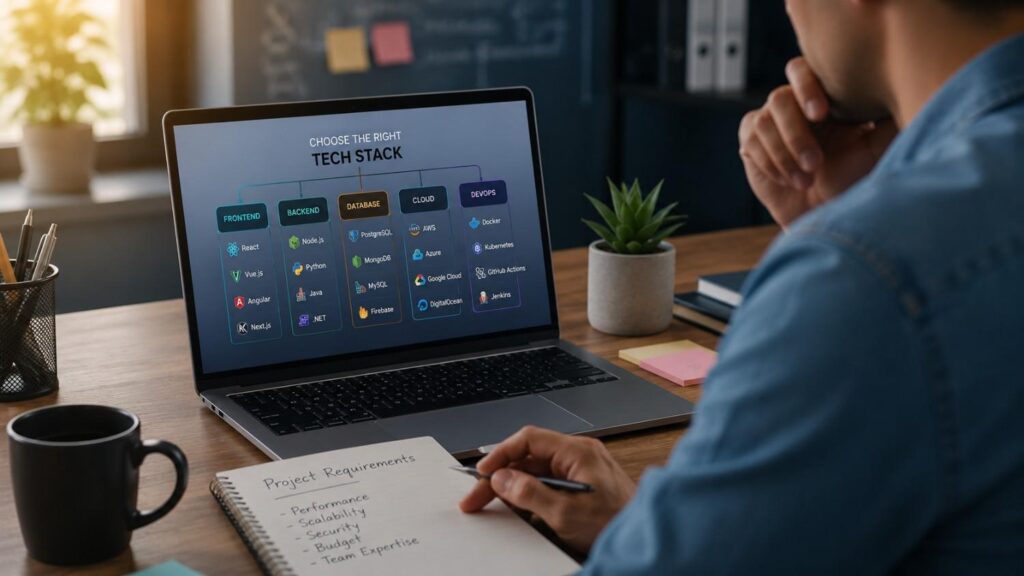
How to Choose the Right Tech Stack for Your App
Choosing the right technology stack is one of the most important decisions in the app development process. It affects how fast your app can be built, how well it performs, how secure it is, how much it costs to maintain, and how easily it can scale when more users start using it. Many businesses focus first on design, features, or launch timelines, but the tech stack quietly shapes almost everything behind the scenes.
When people ask How to Choose the Right Tech Stack for Your App, they are usually looking for one perfect answer. In reality, there is no single stack that works for every product. A marketplace app, fintech app, healthcare app, booking app, social platform, delivery app, and internal business app all have different technical needs. The right decision depends on product goals, user expectations, available budget, team expertise, security needs, and future roadmap.
In my experience, the best approach is to avoid choosing tools too early. First, define the app’s purpose, core features, target users, expected traffic, and business model. After that, compare frontend, backend, database, infrastructure, and security options based on real requirements. This guide explains How to Choose the Right Tech Stack for Your App in a practical, professional, and easy-to-understand way so you can make a smarter decision before development begins.
Understand What an App Tech Stack Really Means
An app technology stack is the full set of technologies used to design, build, run, secure, and maintain an application. It is not just one programming language or one framework. It includes the frontend users interact with, the backend that processes logic, the database that stores information, the APIs that connect services, the cloud infrastructure that hosts the product, and the tools used for testing, analytics, monitoring, and deployment. When these layers work well together, the app feels smooth, reliable, and easy to update.
Understanding the software development stack is important because every layer affects another layer. A fast frontend cannot deliver a good experience if the backend is slow. A strong backend may still struggle if the database is poorly designed. A beautiful app can still fail if security, authentication, or hosting decisions are weak. This is why choosing an app technology stack should be treated as a complete product decision, not only a developer preference.
For beginners, the easiest way to think about a tech stack is like the structure of a building. The frontend is what people see, the backend is the machinery behind the walls, the database is the storage system, and the infrastructure is the foundation. If one part is weak, the whole product can suffer. That is why the first step in How to Choose the Right Tech Stack for Your App is understanding what each part does and why it matters.
Frontend, Backend, Database, and Infrastructure
The frontend is the visible part of the app. It includes screens, buttons, forms, navigation, animations, and the overall user experience. For mobile apps, frontend choices often include native technologies such as Kotlin for Android and Swift for iOS, or cross-platform frameworks such as Flutter and React Native. Flutter is described by its official website as an open-source framework for building natively compiled, multi-platform apps from a single codebase. React Native allows developers who know React to create native apps and write common features once across platforms.
The backend is the server-side part of the app. It manages user accounts, business logic, permissions, payments, notifications, APIs, and integrations with third-party systems. The database stores information such as profiles, orders, messages, product details, bookings, or financial records. Infrastructure includes hosting, cloud storage, load balancing, monitoring, backups, and deployment tools. Together, these layers decide how stable, secure, and scalable your app will be after launch.
Why the Stack Affects Cost, Speed, and Quality
Your mobile app tech stack has a direct impact on cost because different technologies require different skill levels, team structures, timelines, and maintenance effort. If you build separate native Android and iOS apps, you may need two development teams. If you choose a cross-platform framework, you may reduce duplicate work, especially for MVPs and business apps. However, that does not mean cross-platform is always cheaper in the long run. Complex features, custom animations, or deep hardware integrations may still require native development.
The stack also affects speed. A team that already knows JavaScript may move faster with Node.js and React Native than with a completely unfamiliar language. Node.js is officially described as a cross-platform JavaScript runtime that can be used for servers, web apps, command-line tools, and scripts.
Quality is also connected to the stack. Well-supported technologies usually have better documentation, stronger communities, tested libraries, and easier hiring options. Poorly matched technologies may create bugs, slow performance, unstable releases, and expensive refactoring later.
Start With Product Goals Before Choosing Tools
Before you choose tech stack options, define what the app needs to achieve from a business and user point of view. Technology should support the product strategy, not lead it blindly. A common mistake is choosing a trendy framework before understanding the actual product requirements. This can lead to overengineering, unnecessary cost, weak performance, or a stack that does not fit future needs. A clear product plan makes technical decisions easier and more accurate.
Start by identifying the app category. Is it a marketplace, social app, booking platform, fintech product, healthcare app, SaaS tool, delivery app, education app, or internal company system? Each category has different technical expectations. A fintech app may need stronger security, audit logs, and compliance planning. A social app may need real-time updates, media storage, notifications, and scalable feeds. A booking app may need calendar logic, payment integration, and reliable availability management.
You should also define the user journey before selecting tools. What will users do when they open the app? Will they create accounts, upload files, make payments, chat with others, track orders, use maps, save offline data, or receive push notifications? These features influence frontend, backend, database, and infrastructure choices. One thing I always check first is whether the app is simple enough for an MVP stack or complex enough to justify a more custom architecture.
Match the Stack to App Type and Features
Different app features require different technical capabilities. If your app needs real-time chat, live tracking, notifications, collaborative editing, or instant status updates, you need a backend and database setup that can handle frequent data changes. Firebase Cloud Firestore is built for cloud-hosted NoSQL data and is commonly used where real-time syncing is important. Firebase Authentication also provides backend services, SDKs, and ready-made UI libraries for authenticating users across platforms.
If your app handles structured business data, such as orders, invoices, subscriptions, inventory, or user roles, a relational database like PostgreSQL may be a strong choice. If your data is flexible, document-based, and changes shape often, MongoDB may be suitable. For media-heavy apps, you also need to consider file storage, image optimization, CDN delivery, and upload security. The right app development technologies should match the actual feature set instead of forcing the product into a stack that only looks modern.
Consider MVP, Growth, and Maintenance
An MVP should be built to test the core idea quickly, but it should not be built carelessly. Many startups choose an app tech stack for MVP development based only on speed, then suffer later when the product gains traction. A good MVP stack should be simple, affordable, and flexible enough to support the next few versions. It does not need enterprise-level complexity from day one, but it should avoid shortcuts that make future development painful.
For early-stage apps, cross-platform development, managed backend services, and proven databases can reduce development time. For long-term products, maintainability becomes more important. Ask whether developers are easy to hire, whether documentation is strong, whether the community is active, and whether the tools are likely to remain supported. In my experience, a stack that your team understands deeply is often better than a stack that looks impressive but is difficult to maintain. Long-term success depends on updates, bug fixes, security patches, performance improvements, and smooth feature expansion.
| App Type | Recommended Frontend | Recommended Backend | Suggested Database | Best For |
|---|---|---|---|---|
| MVP Startup | Flutter or React Native | Node.js or Firebase | Cloud Firestore | Fast validation and lower development cost |
| E-commerce App | Flutter, React Native, or Native | Node.js or .NET | PostgreSQL | Secure transactions and product management |
| Social Media App | Flutter or Native | Node.js | MongoDB or Cloud Firestore | Real-time messaging and user-generated content |
| Fintech App | Native (Kotlin & Swift) | Java or .NET | PostgreSQL | High security and financial transactions |
| Healthcare App | Native | Java, .NET, or Python | PostgreSQL | Sensitive patient data and compliance |
| Enterprise Business App | Flutter or Native | Java or .NET | PostgreSQL | Scalability, integrations, and long-term maintenance |
Choose the Right Frontend Approach
The frontend approach shapes how users experience your app. It affects speed, design quality, animations, navigation, offline behavior, device compatibility, and platform-specific features. For mobile apps, the main decision is usually native app development versus cross-platform app development. Both options can produce high-quality apps, but they serve different goals. The wrong choice can increase development cost or limit performance, while the right choice can make development smoother and more predictable.
Native app development usually means building separate apps for Android and iOS using platform-specific languages and tools. This gives strong control over performance, device features, and platform-specific design. Cross-platform app development allows developers to share a large part of the codebase across Android, iOS, and sometimes web or desktop. This can reduce duplicate work and speed up development, especially for MVPs and business-focused apps.
The best frontend decision depends on what matters most for your product. If the app needs advanced camera controls, complex animations, gaming-level performance, or deep operating system integration, native may be safer. If the app is a marketplace, booking app, content app, productivity app, or internal business tool, cross-platform may be more cost-effective. This is a key step in How to Choose the Right Tech Stack for Your App because frontend decisions often shape budget, timeline, and user experience from the beginning.
Native App Development
Native app development is usually the best option when performance, platform-specific behavior, and deep device integration are top priorities. For Android, Kotlin is the recommended modern language according to Android’s official developer documentation. For Apple platforms, Swift is widely used to build apps with Apple’s development tools and learning resources.
Native development gives developers direct access to device APIs, operating system features, platform UI patterns, and performance optimization tools. This can be important for apps involving financial security, healthcare workflows, audio/video processing, augmented reality, Bluetooth devices, or advanced location tracking. The main downside is cost and coordination. Building two separate native apps means more code, more testing, and often more developers. However, for complex products where user experience and performance are critical, native development can be worth the investment because it gives more control and fewer framework limitations.
Cross-Platform App Development
Cross-platform app development is often a smart choice when the goal is to launch faster, control cost, and maintain one shared codebase across multiple platforms. Flutter and React Native are two of the most common options. Flutter supports building multi-platform applications from a single codebase, while React Native allows React developers to create native apps and reuse common features across platforms.
This approach is useful for startups, MVPs, marketplaces, booking apps, content platforms, dashboards, eCommerce apps, and business tools. It can reduce duplicate development work because the same team can often handle both Android and iOS. However, cross-platform is not always perfect for every case. Apps with highly specific device features may still need native modules. Performance-heavy apps may require extra optimization. The decision should be based on real product needs, not just cost savings. If the app’s features are mostly standard and the budget is limited, cross-platform can be a practical and professional choice.
| Frontend Approach | Best For | Main Benefit | Main Limitation |
|---|---|---|---|
| Native Kotlin/Swift | Performance-heavy mobile apps | Strong platform control | Higher cost for two platforms |
| Flutter | Multi-platform apps with custom UI | Single codebase and consistent UI | Requires Dart expertise |
| React Native | Apps using React or JavaScript teams | Faster shared development | Native modules may be needed |
| PWA | Web-first apps and simple tools | Easy browser access | Limited native app experience |
Select Backend, Database, and Cloud Infrastructure Carefully
The backend is the engine of your app. It handles the logic users do not see but depend on every time they log in, search, place an order, send a message, make a payment, or update their profile. A strong frontend can attract users, but a weak backend can quickly damage trust. Slow responses, failed payments, broken notifications, poor data handling, and downtime often come from backend and infrastructure decisions that were not planned properly.
When choosing backend technology for mobile apps, you need to think beyond launch day. The backend should support current features while leaving room for future growth. It should be secure, maintainable, testable, and easy to integrate with other services. The database should match your data structure, and the cloud infrastructure should support reliability, backups, monitoring, and cost control. These decisions are especially important for apps that handle user accounts, subscriptions, financial records, private messages, healthcare data, or business workflows.
A simple app may work well with managed services such as Firebase or a lightweight backend. A more complex product may need custom APIs, structured databases, queue systems, caching, background jobs, and cloud architecture. The right backend is not always the most complex one. It is the one that supports your product needs without creating unnecessary operational burden. This is where many businesses either save money through smart planning or lose money through poor early decisions.
Backend Framework and API Architecture
Backend frameworks help developers build APIs, authentication systems, business logic, admin panels, integrations, and server-side workflows. Common backend technologies include Node.js, Python, Java, Go, Ruby, PHP, and .NET. Node.js is a strong option for teams already working with JavaScript because it allows JavaScript to be used on the server side as well. Its official website describes it as a cross-platform runtime for servers, web apps, command-line tools, and scripts.
API architecture also matters. REST APIs are widely used because they are simple, familiar, and easy to integrate. GraphQL can be useful when apps need flexible data queries and want to reduce unnecessary data transfer. WebSockets or real-time services may be needed for live chat, tracking, gaming, or collaborative features. I recommend keeping backend architecture as simple as possible in the early stage. Add complexity only when there is a clear product reason. Clean APIs, good documentation, and proper testing are more valuable than trendy architecture patterns that the product does not need yet.
Database Selection
Database selection is one of the most important parts of a scalable technology stack. PostgreSQL is a powerful open-source object-relational database system with a strong reputation for reliability, feature robustness, and performance. It is often a good choice for structured data, financial records, orders, roles, transactions, reporting, and business workflows.
MongoDB uses a document model where records are stored as flexible JSON-like documents. This can be useful for apps where the data structure changes often or where nested data fits naturally into the product model.
Firebase Cloud Firestore can also be useful for apps that need quick setup and real-time data updates. The decision should depend on your data, not popularity. If your app needs strict relationships and complex queries, relational databases usually make sense. If your app needs flexible documents and fast iteration, a document database may work better. Poor database design can slow down the app, increase infrastructure cost, and make future reporting difficult.
Evaluate Security, Compliance, and App Store Requirements
Security should be part of the tech stack decision from the beginning, not something added at the end. If your app collects names, emails, phone numbers, payment details, location data, health data, business documents, or private messages, users expect that information to be handled responsibly. A weak security setup can damage user trust, create legal risk, and cause expensive rework after launch. That is why app security must influence your frontend, backend, database, authentication, hosting, and third-party service choices.
Security is not only about using HTTPS or adding a login screen. It includes secure authentication, password handling, role-based access, encrypted communication, secure data storage, API protection, dependency updates, server monitoring, input validation, privacy controls, and safe error handling. If the app includes payments or sensitive data, security planning becomes even more important. You should also think about who can access admin panels, how logs are stored, and how data is backed up.
App store requirements are another part of the decision. Apple and Google both have rules around app quality, privacy, performance, permissions, payments, content, and user experience. Apple’s App Review Guidelines are organized into sections such as Safety, Performance, Business, Design, and Legal. Google Play states that apps should provide basic functionality and a respectful user experience, and apps that crash or behave inconsistently may violate policy expectations.
Build Security Into the Stack
A secure stack starts with the right architecture. User authentication should be handled through reliable methods, passwords should never be stored in plain text, and sensitive data should be protected both in transit and at rest. Firebase Authentication, for example, provides backend services and SDKs for user sign-in, which can help teams avoid building basic authentication flows from scratch.
For mobile app security, OWASP MASVS is an important reference because it is described by OWASP as the industry standard for mobile app security. It can be used by architects, developers, and testers to guide secure mobile application development and testing.
When choosing libraries and frameworks, check whether they are actively maintained, widely used, and regularly updated. Avoid outdated packages because they may introduce security vulnerabilities. Also plan for permissions carefully. If the app asks for camera, location, microphone, contacts, or storage access, those permissions should be necessary and clearly explained to users.
Check Platform Rules Early
App store rules can affect both product design and technology decisions. Apple’s App Review Guidelines cover safety, performance, business, design, and legal areas, which means your app must meet more than just technical requirements before approval.
Google Play’s policy guidance also emphasizes functionality and user experience. Apps that crash, behave inconsistently, or fail to provide a basic useful experience can create approval and visibility problems.
This matters when choosing a tech stack because your tools should support stable performance, proper permission handling, privacy controls, and compliant payment flows. For example, subscription apps, fintech products, health apps, and apps with user-generated content may need extra review preparation. Before development begins, document how the app will handle account deletion, privacy policies, permissions, data storage, payment processing, and moderation. This reduces launch delays and helps developers build with platform expectations in mind from the first sprint.
Think About Scalability and Long-Term Architecture
Scalability means your app can handle growth without breaking, slowing down, or becoming too expensive to maintain. However, scalability does not mean building a huge enterprise architecture before you have users. The real goal is to make decisions that allow your app to grow step by step. A scalable technology stack should support more users, more features, more data, and more integrations without forcing a complete rebuild too early.
Many businesses misunderstand scalability. They either ignore it completely or overbuild from the start. Ignoring scalability can cause downtime, slow performance, and rushed emergency fixes when traffic increases. Overbuilding can waste money, delay launch, and make the product harder to maintain. The best approach is balanced planning. Build what the current stage needs, but use clean architecture, reliable tools, and good development practices so the app can evolve.
Scalability includes more than servers. It also includes database performance, caching, background jobs, file storage, API limits, monitoring, error tracking, deployment process, and team workflow. A scalable app should also be easy for developers to understand. If only one person knows how the system works, the product has an operational risk. When thinking about How to Choose the Right Tech Stack for Your App, long-term architecture should always be part of the discussion, even if the first version is small.
Cloud Architecture and Reliability
Cloud infrastructure affects uptime, speed, cost, and recovery. AWS Well-Architected is built around six pillars: operational excellence, security, reliability, performance efficiency, cost optimization, and sustainability. These pillars are useful when evaluating whether your app architecture is strong enough for real-world use.
For a small app, you may not need complex cloud architecture. Managed hosting, serverless functions, or platform-as-a-service tools may be enough. For a growing app, you may need load balancing, automated backups, monitoring, CDN support, queue systems, and disaster recovery planning. Reliability also depends on how the app handles failure. If one service goes down, the entire app should not collapse if that can be avoided. Good cloud planning helps teams control cost while keeping the app stable. The goal is not to use every cloud feature. The goal is to choose only the services that support your product’s current and future needs.
Avoid Overengineering Too Early
Overengineering happens when a team builds more complexity than the product needs. This often happens when founders ask for microservices, advanced infrastructure, or enterprise-level architecture before validating the app idea. While those patterns can be useful for large systems, they can slow down small teams and make simple features harder to build. In many early-stage products, a well-structured modular monolith is easier to develop, test, deploy, and maintain.
Avoiding overengineering does not mean ignoring quality. It means using smart simplicity. Write clean code, separate responsibilities, document APIs, use version control properly, test critical workflows, and choose a database that can support growth. Add complexity when user demand, traffic, or product requirements justify it. In my experience, the best early-stage app architecture is the one that gives developers enough structure without slowing every decision. This helps reduce technical debt while keeping the product flexible. A stack should make the team faster, not trap them in unnecessary systems before the business has proven demand.
Use a Practical Decision Framework
The easiest way to choose tech stack options is to score them against real business and technical factors. This removes guesswork and reduces emotional decision-making. Developers may naturally prefer tools they already like, while founders may prefer tools they have heard about from other startups. A decision framework keeps everyone focused on what the product actually needs. It also helps explain the final decision to stakeholders, investors, designers, and future developers.
A useful framework should compare platform needs, performance expectations, development speed, cost, security, scalability, maintenance, hiring availability, and ecosystem maturity. For example, Flutter may score high for shared UI and fast multi-platform development. Native Kotlin and Swift may score higher for device-specific performance. Firebase may score high for fast MVP development, while PostgreSQL may score higher for structured business data and long-term reporting. These scores help you see trade-offs clearly.
The goal is not to find a perfect stack with no weaknesses. Every technology has trade-offs. The goal is to select the option with the best fit for your app’s stage, budget, features, and roadmap. This is one of the most practical ways to answer How to Choose the Right Tech Stack for Your App because it turns a broad question into a structured decision.
| Decision Factor | What to Consider | Why It Matters |
|---|---|---|
| Target Platform | Android, iOS, Web, or Multi-platform | Determines whether native or cross-platform development is the better fit. |
| Development Budget | Startup, SMB, or Enterprise budget | Influences technology choices and infrastructure costs. |
| Time to Market | MVP or full-scale product | Faster frameworks help launch products more quickly. |
| Performance Needs | Basic, Moderate, or High-performance | Heavy apps often benefit from native development. |
| Scalability | Expected user growth | The stack should support future expansion without major rewrites. |
| Team Expertise | Existing developer skills | Familiar technologies reduce learning curves and maintenance costs. |
| Security Requirements | Authentication, encryption, compliance | Essential for protecting user data and meeting industry standards. |
| Long-Term Maintenance | Community support and updates | Well-supported technologies reduce technical debt over time. |
Questions to Ask Before Finalizing the Stack
Before finalizing the stack, ask clear questions about product needs and business goals. What platforms do you need first: Android, iOS, web, or all three? Is speed-to-market more important than deep native performance? Does the app need offline access, real-time updates, maps, payments, chat, file uploads, or complex dashboards? These answers will quickly narrow down frontend, backend, and database choices.
You should also ask operational questions. Can your team maintain this stack after launch? Are developers easy to hire? Is the documentation strong? Are the libraries active and supported? What will happen if traffic grows quickly? How will the app handle backups, errors, monitoring, and security updates? These questions are not only technical. They protect the business from future cost and delays. A stack that looks cheaper during development may become expensive if it is hard to maintain. A stack that looks powerful may be unnecessary if the product only needs a simple MVP. The best decision balances ambition with practical delivery.
Final Stack Selection Checklist
A strong app technology stack should be reliable, secure, maintainable, scalable, and realistic for your team. It should support your app’s core features without creating unnecessary complexity. It should also have strong documentation, active community support, and enough developer availability in the market. If your team cannot maintain the stack confidently, it may not be the right choice even if the technology itself is excellent.
Use a simple checklist before approving the final stack. Confirm that the frontend approach fits your user experience goals. Confirm that the backend can handle business logic and integrations. Confirm that the database matches your data structure. Confirm that the infrastructure can support expected traffic. Confirm that authentication and security are planned from the beginning. Confirm that app store requirements have been considered. Finally, confirm that the stack can support at least the next two or three product versions. This approach helps you avoid rushed decisions and gives the project a stronger technical foundation.
Quick Answer About How to Choose the Right Tech Stack for Your App
To choose the right tech stack for your app, start by understanding what the app must do, who will use it, which platforms it needs to support, and how much growth you expect after launch. A simple MVP may work well with Flutter, React Native, Firebase, Node.js, or PostgreSQL, while a performance-heavy product may need native development with Kotlin for Android and Swift for Apple platforms. Kotlin is Android’s recommended language for modern Android development, and Apple provides Swift learning resources for building apps across Apple platforms.
The best stack is not always the newest or most popular one. It is the stack your team can build, maintain, secure, test, and scale without creating avoidable technical debt. Before choosing tools, compare performance needs, development cost, developer availability, database structure, security requirements, and long-term maintenance.
Frequently Asked Questions
FAQs are useful because many business owners, founders, and product managers have similar questions before development starts. These answers are written in a direct and practical way to help readers make better early decisions without getting lost in technical language.
What is the best tech stack for app development?
The best tech stack for app development depends on the app type, budget, timeline, platform needs, and performance requirements. A startup MVP may use Flutter or React Native for the frontend, Node.js or Firebase for the backend, and PostgreSQL or Firestore for data storage. A complex banking, healthcare, or performance-heavy app may need native Kotlin and Swift development with custom backend architecture. The best stack is the one that matches your actual product requirements and can be maintained by your team.
How do I choose a technology stack for a mobile app?
To choose a mobile app tech stack, start by defining your platforms, features, budget, timeline, and long-term roadmap. Then decide whether native or cross-platform development makes more sense. After that, choose backend technology, database, authentication method, hosting, analytics, and security tools. I recommend comparing each option against performance, cost, hiring availability, scalability, and maintenance. Avoid choosing a framework only because it is popular. Popular tools are helpful, but product fit matters more.
Should I choose native or cross-platform app development?
Choose native app development if your app needs advanced performance, deep device integration, platform-specific design, or complex hardware access. Choose cross-platform app development if you want to launch on Android and iOS faster with a shared codebase. Flutter and React Native are common choices for MVPs, marketplaces, booking apps, and business apps. Native development is often better for apps where performance, security, and platform control are more important than initial speed.
Which backend is best for a mobile app?
The best backend for a mobile app depends on the product’s complexity. Firebase can be useful for MVPs, authentication, and real-time data features. Node.js is a strong option for JavaScript-based teams and API-driven applications. Python, Java, Go, and .NET can also be suitable for more complex systems. The backend should support your app’s workflows, integrations, security needs, and expected traffic. Do not choose backend technology only based on trend. Choose it based on fit.
What database should I use for my app?
Use PostgreSQL when your app needs structured data, relationships, transactions, reporting, and long-term reliability. Use MongoDB when the data is flexible, document-based, and likely to change shape over time. Use Firebase Cloud Firestore when you need real-time syncing and fast MVP development. The database should match how your app stores and retrieves data. A poor database choice can create slow queries, reporting problems, and expensive migrations later.
How does tech stack affect app development cost?
The tech stack affects development cost through team size, development speed, testing effort, maintenance, infrastructure, and hiring availability. Native development may cost more if you need separate Android and iOS teams. Cross-platform development may reduce early cost by sharing code. However, complex apps may still need native support. Long-term cost also depends on how easy the stack is to update, secure, and scale. A cheap stack at launch can become expensive if it creates technical debt.
Can I change my app tech stack later?
Yes, you can change your app tech stack later, but it can be expensive and time-consuming. Small changes, such as replacing a third-party service or improving an API, are manageable. Larger changes, such as replacing the frontend framework or migrating the database, require careful planning and testing. That is why early stack selection matters. A thoughtful decision can reduce the chance of a full rebuild and make future improvements easier.
Conclusion
Choosing How to Choose the Right Tech Stack for Your App is not about selecting the most popular framework or copying what another company used. It is about understanding your product, users, business goals, budget, security needs, and growth plan. The right stack should help your team build efficiently, launch confidently, and maintain the product without unnecessary technical debt.
Start with the app’s purpose and feature requirements. Then compare frontend approaches, backend options, database choices, cloud infrastructure, security standards, and app store expectations. Native development may be best for performance-heavy apps, while cross-platform development may be better for fast MVPs and budget-conscious launches. PostgreSQL, MongoDB, Firebase, Node.js, Flutter, React Native, Kotlin, and Swift all have useful roles, but none of them is perfect for every product.
The smartest decision is the one that balances technical quality with business reality. A good tech stack should support today’s version while preparing the app for future growth. If you are planning a new product, take time to evaluate your options carefully before development starts.